
STOREBASE INSIGHTS · Team management
How to set a leave rule before the next request arrives
Set the leave type and its rule once, then review each request against that written rule. Do not let a familiar employee or a busy week decide the rule for everyone.

On this page
The awkward part is not the request
A leave request becomes uncomfortable when the owner has to invent the answer at the moment it arrives: paid or unpaid, how many days, and whether this person has earned it. That is how a reasonable exception turns into a standard nobody can see.
The useful question is not “How flexible should I be today?” It is “Which rule did we agree to use before today?”
The operating lesson is direct: With nothing visible at a glance, things get handled loosely — and the flex always bends the owner's way. With no record to point at, staff don't argue. They just quit. A rule is valuable here because it gives both sides something to read before the conversation becomes personal.
A practical setup
- Name the leave type. Separate Annual Leave from other types such as unpaid leave or an excused day off. The label matters because “time away” is not one legal or payroll category.
- Choose the rule inputs. Decide the entitlement, the cycle or effective date, and whose employment start date matters. The rule form captured in Storebase shows an annual rule with a days field and a start-date choice; another screen shows that an employee setup or hire date may still need attention.
- Write the boundary outside the app. Confirm your contract, local labour rules, part-time treatment, carry-over and pay treatment before saving. A screen that accepts “12 days from Jan 1,” for example, is an input state—not proof that 12 days is lawful for your workers.
- Apply the same rule to the next request. The manager still decides whether a request is approved and whether the store can operate. The rule answers entitlement; it does not replace coverage planning.
What the product action changes
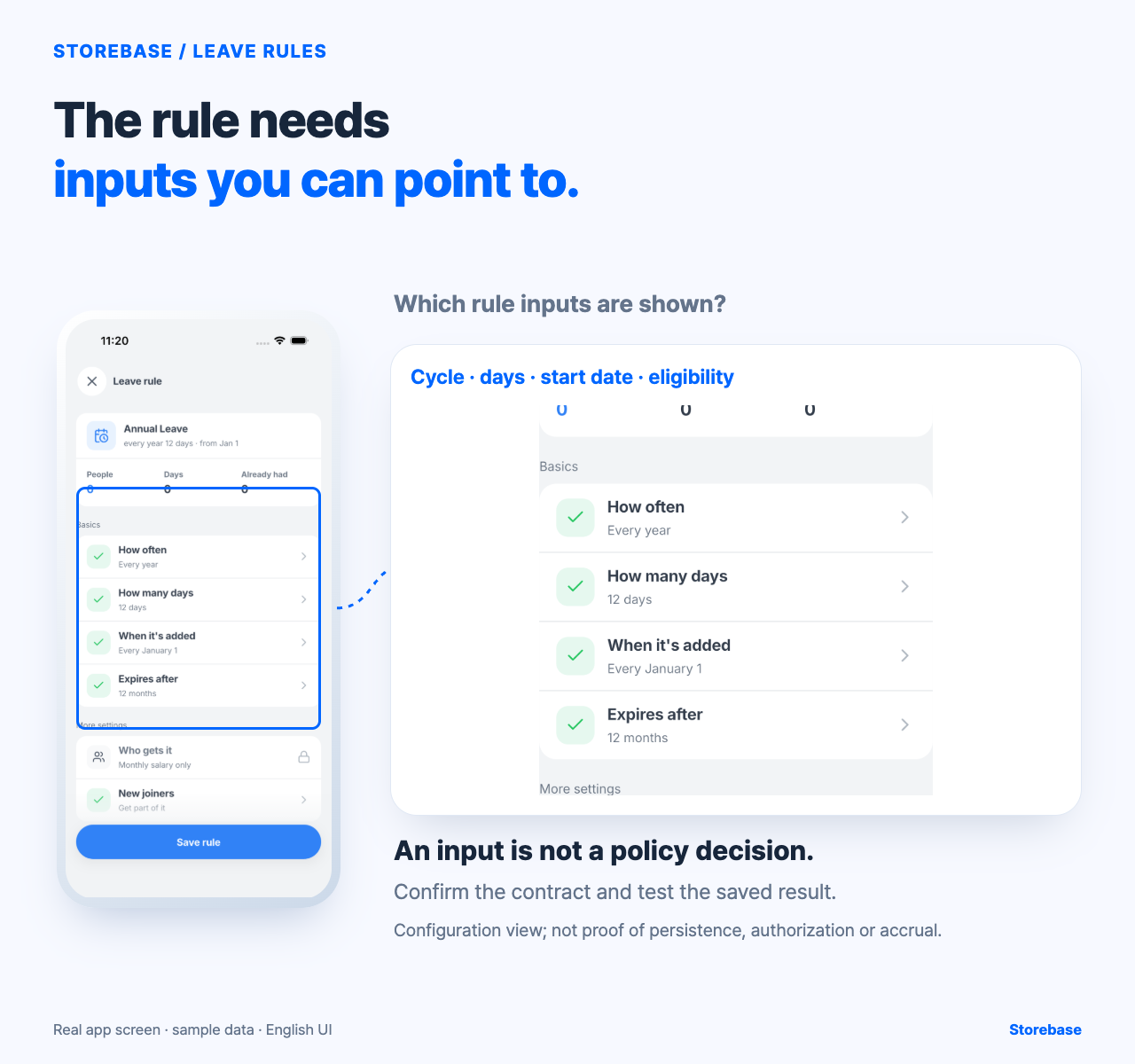
In the captured Leave Setting view, Annual Leave is marked “Paid · Deducts balance,” while the rule row says “No rule — Tap to set one up.” Opening it leads to a rule form whose visible defaults include “Every year,” “12 days,” and “From Jan 1.” That is a concrete place to turn a private judgement into a shared setting.
The benefit is conditional: when the inputs are correct and the saved behaviour is verified, the owner can point to the same rule instead of reconstructing the decision in a chat. The captured form is useful for reviewing the inputs, while saved persistence, authorization, effective-date validation and the final accrual result still need verification.
Keep these jobs separate
| Question | Who must answer it? |
|---|---|
| What leave type and entitlement apply? | Owner or adviser, using the contract and local law |
| Does the app show a rule for this employee? | Manager, in Leave Setting |
| Can the store cover the dates? | Manager and team, using the schedule |
| Was the rule saved and did the balance change correctly? | Manager, with a controlled test and re-check |
This separation is important. A rule screen is not legal advice, and a visible rule is not proof that a request should be approved. It simply makes the decision inspectable.
The result to check
After setting a rule, record one test employee’s starting date, expected entitlement and next accrual date. Re-open the setting and check the balance or status after the documented event. If the result differs, stop and resolve the configuration or ask a qualified local payroll adviser; do not quietly override the record.
That small check is the path from owner memory to a repeatable operation. Staff can ask about the same rule, the manager can handle the request, and the owner is called in only for an exception. The point is not to remove judgement. It is to stop changing the standard by mood.
Version the rule so a policy change does not rewrite an earlier request
A leave type can keep the same name while its meaning changes. Attach a version and effective date to eligibility, accrual, carryover, notice, documentation, and approval conditions. A request should retain the rule version used when the decision was made, even after a new version takes effect. Otherwise an older decision can become impossible to explain: the current settings look correct, but they are no longer the settings the manager applied.
Before activation, decide how people already employed move to the new rule. Write down whether existing balances remain, are converted by an explicit method, or require individual review; do not let a settings edit silently answer that policy question. Treat an exception for one person as a dated exception with an approver and reason, not as an invisible change to the common definition. If the exception reveals a recurring case, revise the policy prospectively and communicate the new version to the affected group.
The owner benefit is consistency without pretending every case is identical. Managers can see which standard governs a request, employees can challenge a mismatch against a named version, and a later correction does not erase the basis of the first decision. Employment counsel or the responsible adviser should review the transition where local law, contracts, or accrued rights may constrain the choice.
Test boundaries with people, dates, and a second reviewer
Run a small scenario set before accepting live requests. Use at least two employees with different hire dates or eligibility positions, a date just before the effective boundary, a date exactly on it, and a date after it. Add one insufficient-balance case and one request spanning a period boundary. For every result, record the input, expected rule version, expected outcome, and the clause that explains it. This is a policy test first; it should not assume the application decides legality.
Have a manager who did not configure the rule repeat the cases from the written policy and the visible settings. A mismatch may come from ambiguous wording, an incorrect value, a display that omits a necessary condition, or a process step outside the product. Label the cause before changing anything. Fixing a policy ambiguity by editing an employee balance merely hides the defect.
After the first real cycle, sample one approved, one declined, and one edited request. Pass the regression check only when the original input, applicable version, decision reason, approver, and any correction remain distinguishable. Also confirm that a future-dated policy did not affect an earlier request. Storebase can support the evidenced configuration and leave-record steps described above; the business still owns policy validity, transition choices, manager judgment, staffing coverage, and any payroll consequence.