
STOREBASE INSIGHTS · Inventory management
Why inventory doesn't match: fixing the number is only the start
Inventory discrepancies can come from different counting definitions, missing or duplicate transactions, delayed updates, or physical loss. First recount on the same basis, then trace receipts, sales, returns and transfers to narrow down where the difference arose. Correcting the quantity does not establish the cause or prevent a repeat. The goal is to change the process that keeps producing the discrepancy—not just today's number.

On this page
- Why does the same inventory question come back next week?
- Are physical stock and system inventory measuring the same thing?
- Turn “four units missing” into a question about a movement
- After finding the cause, test the next transaction
- Look beyond fast counting when choosing inventory software
- Leave the owner the exceptions, not every check
Why does the same inventory question come back next week?
“The stock for this item is wrong again.”
For an owner moving between two or three stores, or a manager responsible for closing, this may be a familiar interruption. You already know stock needs checking. The harder part is keeping recording and checking connected during a busy shift. If sales are in the POS, transfers are in chat, and the final explanation lives in the owner's memory, each handover starts another investigation. This is an illustrative situation, not a reported customer case.
Changing the system quantity to match the shelf can make the immediate problem disappear. But if the owner has to reconstruct the same story next week, only the result was corrected.
Inventory quantity is an outcome. To understand a difference, follow the movements that produced it.
What arrived, what sold, and what left for another location? Was each movement recorded? If a missing record is confirmed, ask why that step failed.
Storebase builds store operating tools to help daily work continue when the owner is away. Our principle here is that the person on site should be able to check a difference and leave enough context for the next person to continue. This article offers an operating approach, not a measured customer result or accounting instruction. Start with the checks below, whether or not you change software.
Are physical stock and system inventory measuring the same thing?
Physical stock is the quantity you count. System inventory is the quantity recorded in your software. Align four things before comparing them:
- Time: Are you comparing a morning system balance with an afternoon count? Separate sales and receipts before and after the count's cut-off.
- Location: Does the system include a stockroom that nobody counted?
- Status: Are you comparing stock on hand with stock available to sell? Check how reserved items and returns awaiting inspection are treated.
- Item and unit: Is it the same SKU, size and colour? Convert cases and individual units consistently.
Shopify, for example, distinguishes on-hand, available and incoming inventory. Having an item at a location is not the same as being able to sell it. Check the definitions in your own system. Inventory states
For a store-to-store transfer, dispatch from Store A and receipt at Store B are separate facts. Shopify's transfer workflow also distinguishes transit and full or partial receipt. One side's record does not prove that both sides completed their work. Transfers and receiving
Turn “four units missing” into a question about a movement
If historical records are incomplete, do not invent the missing story. Pick one item in one store, record a count and cut-off time, then link subsequent receipts, sales, returns and transfers to that item. Compare the calculation with the next physical count.
Here is a hypothetical example, not customer data. Everything is counted as individual units in Store A; assume no returns, write-offs or other movements beyond those shown.
| Movement | Quantity change | Evidence to check |
|---|---|---|
| Starting stock | 40 | Last confirmed count |
| Goods received | +10 | Actual receiving record |
| Sales | −8 | Sales dispatch records |
| Sent to Store B | −4 | Dispatch and handover record |
| Expected stock at A | 38 | 40 + 10 − 8 − 4 |
If the physical count is 38 but the system says 42, check whether the four-unit transfer was recorded. The matching difference is a lead, not proof. Compare the actual handover with the system history.
Once a missing transfer is confirmed, record more than “changed to 38.” Link the correction to the item, transfer, supporting evidence and person who corrected it.
Also check for double correction. Entering the missing transfer and separately subtracting four through a stock adjustment would create another error. Review earlier adjustments and follow your software's correction procedure.
After finding the cause, test the next transaction
Suppose the example's transfer record was missing. “Who forgot?” is not a complete diagnosis.
Was the sender expected to enter it later? Did a handover to another person fail? Did the responsible employee lack permission? Or was the record entered correctly but the system update delayed?
Different causes require different changes. Telling staff to record more carefully will not fix a delayed system update.
If goods routinely leave first and someone else records them later, with nobody checking completion, close that gap. The sender records dispatch, the receiving store confirms the same transfer, and a named person reviews unfinished transfers. Give them the access they need.
Then check the next transfer: do dispatch and receipt connect, and do the physical and system quantities agree on the same basis? One successful check is a starting point, not proof that the process will always work. Continue checks at a frequency suited to the risk and transaction volume.
| Status | Question to answer |
|---|---|
| Quantity corrected | What evidence supports the current number? |
| Cause identified | Where and why did the difference arise? |
| Prevention checked | What changed, and was the result checked on later transactions? |
A quantity can be correct while its cause remains unknown. A process can be changed before its effect has been tested. Keep those states separate.
Look beyond fast counting when choosing inventory software
A stock count app should be assessed for what happens after entry, not only how quickly people can count. Can staff compare quantities before applying changes? Can the person responsible inspect the records relevant to a discrepancy?
Storebase's stock-count design connects quantity entry with review before stock is updated. Comparing the previous quantity with the count helps identify an item that needs further investigation. This describes a design direction, not a guarantee of operation in every store environment or automatic root-cause detection.
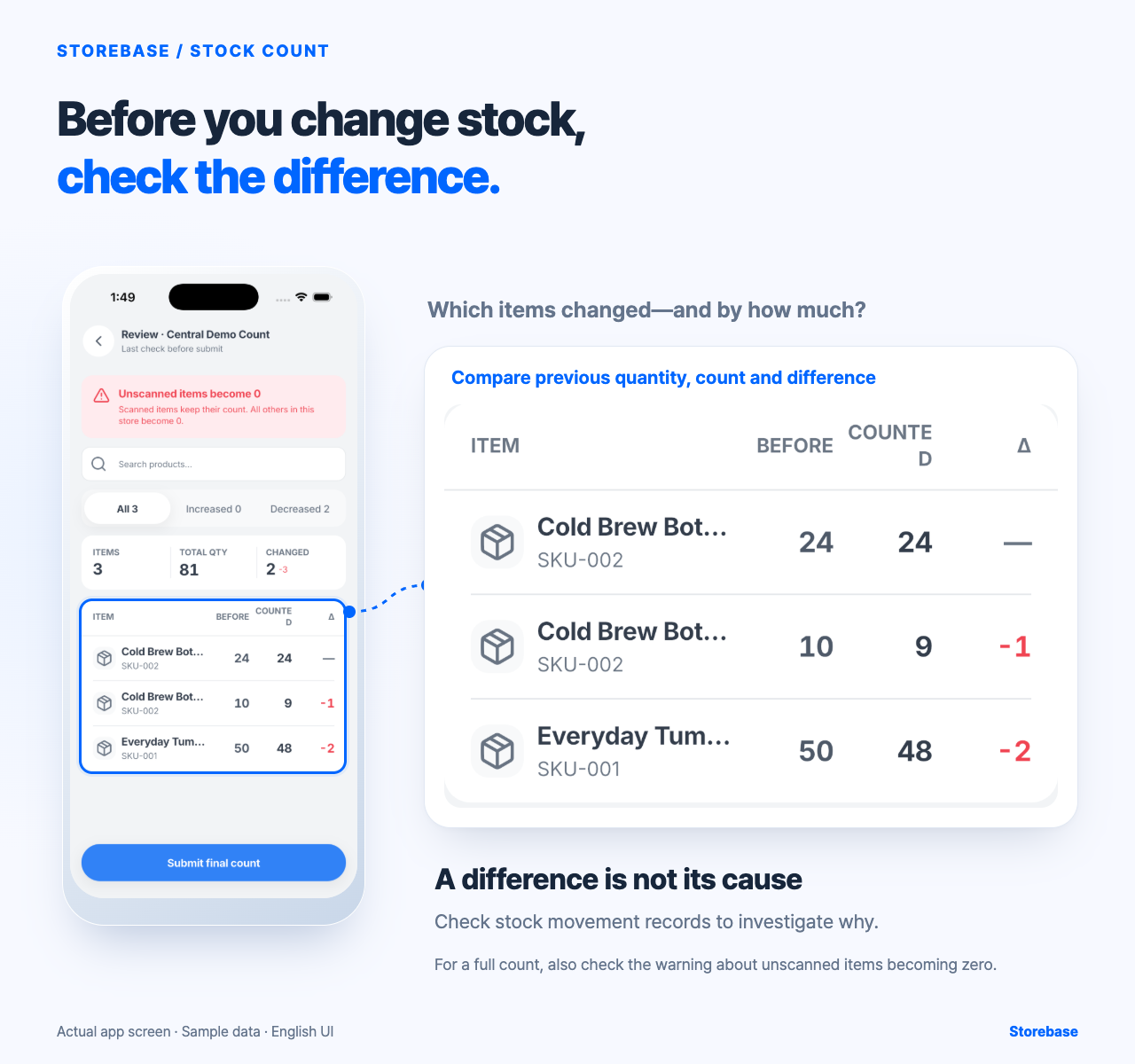
Showing a difference and resolving its cause are different jobs. A review screen does not automatically uncover a broken handover. People still need to check the evidence, change the procedure and verify a later result.
A useful product question is therefore: “When this number is wrong, what can the person in the store check and resolve?”
Leave the owner the exceptions, not every check
You may need to close while a cause is still unresolved. If an operational correction is necessary, follow the approval process, but do not mark the investigation complete. Do not label an unexplained difference “loss” or “staff error” without evidence. Assign the next check and a deadline.
Give the team access to records and clear correction limits. Escalate recurring discrepancies, conflicting evidence and changes outside their authority to a manager or owner. Set thresholds for your own operation; handing over responsibility without access is not delegation.
At the next count, try this on one item: record the comparison basis, history checked, correction, unresolved question, next responsible person and time. If the procedure changes, attach the subsequent check.
A hypothetical note could be: “Store A / Item X / today's close / physical 38, system 42 / checking whether four units sent to B were recorded / manager to check before next opening.” Add evidence and the outcome when available. If the cause is unknown, say so.
Can the next person continue without asking the owner to reconstruct everything? If not, find the missing record, permission or decision rule.
The aim is not to make the owner faster at editing stock. It is to let the team find a difference, investigate, act and recheck—while the owner handles important exceptions. Inventory management should return more than a reliable number: it should give you greater freedom to choose how to spend your time beyond the store.