
STOREBASE INSIGHTS · Inventory management
How can a purchase order stay connected to what each store receives?
Allocate each purchase order to stores before delivery, then keep ordered, shipped and received quantities with their timestamps in one trail. This exposes partial deliveries by store; people still count, confirm and resolve exceptions.

On this page
Allocate the order before anything is shipped
When one purchase order serves several stores, put the intended allocation on the order first: item, unit, destination and quantity. Then keep the supplier’s shipment and each store’s receipt as linked stages. The useful question is not only “How much did we buy?” but “Which store was meant to receive which units, what did the supplier say it shipped, and what did that store count?”
A later spreadsheet can make a partial delivery look complete by merging totals. A trail preserves the difference. At dispatch, record the shipped quantity and time when that information is available. At each store, record the physical receipt, receiver and time. If an order arrives in several shipments or receipts, leave the unfulfilled allocation open rather than replacing it with the latest total.
One comparison table
| Stage | Minimum record | Decision it supports |
|---|---|---|
| Order | item, unit, destination store and allocated quantity | what should arrive where |
| Shipment | supplier-shipped quantity, reference and time | what left the supplier |
| Receipt | counted quantity, receiver and time | what reached the store |
| Exception | open quantity, evidence, next owner and review date | what needs a decision |
A short receipt is an exception to investigate, not immediate proof of supplier error. A shipment may be split, a store may have accepted only part, or the unit may have changed. Compare the three stages, check transfers and later movements, and contact the supplier with the specific open quantity. Do not close an allocation just because the order total looks right.
Compare the trail in Storebase
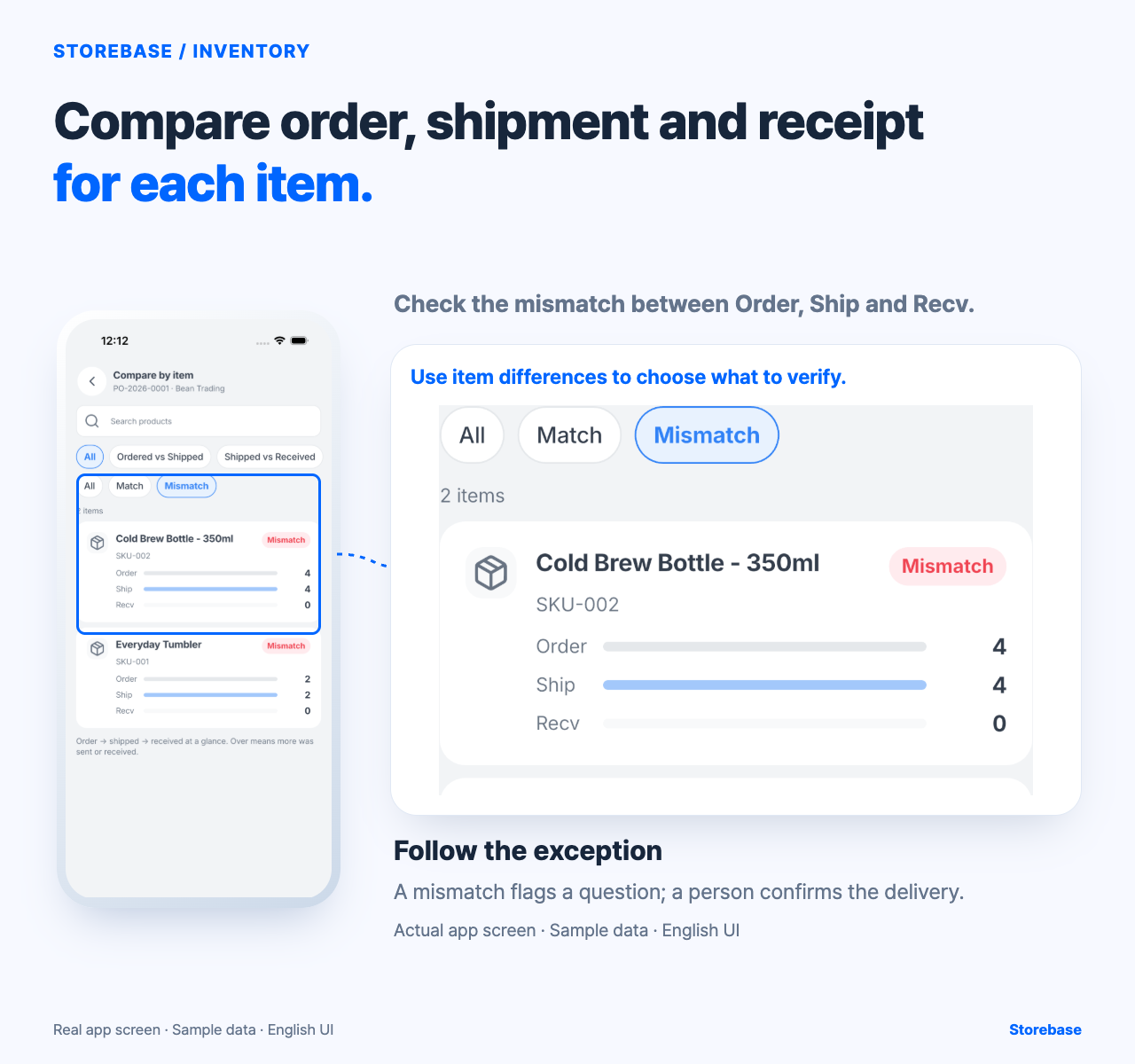
Use the item comparison in Storebase to look at Order, Ship and Recv quantities together, then mark which mismatch needs physical confirmation. Keep the order, shipment note and receiving count connected while a manager resolves the exception.
Storebase can provide one comparison point for order-to-shipment-to-receipt quantities. A mismatch is a question for the person handling the delivery; it is not proof that the shipment was complete, the receiving entry was saved or the supplier has accepted the explanation.
Use a clear handoff. Purchasing records the allocation. The supplier or operator records the shipment. The receiving store counts and records what arrived. A manager reviews the open quantity and evidence; the owner handles a repeated supplier issue or an exception beyond the manager’s authority. The trail is distinct from an inventory-mismatch postmortem: it begins before delivery and keeps store destination attached. It is also distinct from an invoice three-way match: it does not decide tax, payment or accounts-payable treatment.
Checklist for a multi-store order
- List every destination store, item, unit and allocated quantity before dispatch.
- Give the order a stable reference and record the supplier shipment reference when available.
- At each store, count physical units and record receiver, time and condition.
- Compare ordered, shipped and received quantities by store, not only as one grand total.
- Leave partial or unknown quantities open; attach evidence and assign the next reviewer.
- Recheck the trail after the final shipment and record what remains unresolved.
If the order or store is not clearly identified, stop at review needed. Compare the physical delivery and its documents before closing the mismatch; a screen can organize the question but cannot settle the receipt or make its history unchangeable.
The conditional benefit is earlier, location-specific visibility. With complete allocations and disciplined receiving, the manager can spend less time merging competing sheets and more time deciding which open quantity needs action. This does not guarantee complete deliveries, supplier cooperation, a correct store allocation or an automatic follow-up. One successful order proves only that one trail was readable; inspect the next partial delivery before changing the process.
Start with the next order that serves two stores. Write the allocation before the truck leaves, keep the three stages beside each other, and leave an explicit next check. If a missing quantity cannot be explained, preserve it as an open question. A trustworthy trail is one another person can read and test, not a promise that no exception will occur.
Preserve line identity through splits, substitutions, and rerouting
A purchase-order line needs a lineage when reality changes. Keep the original item, unit, destination, and allocated quantity as the parent commitment. A split shipment, approved substitute, rerouted store, backorder, rejection, return, or cross-store transfer becomes a linked child event with its own quantity, time, actor, and reason. Do not edit the parent until it resembles what eventually happened; doing so erases the gap the trail is meant to explain.
Control the conservation of quantity at each decision. For the order allocation, the original quantity should reconcile to fulfilled, cancelled, and still-open quantities. For a shipment, dispatched quantity should reconcile to accepted, rejected, in-transit, and unresolved quantities under the business definition. A store transfer after receipt is a new inventory movement, not a correction to the supplier's destination history. If the unit changes, retain both units and the approved conversion rather than comparing unlike numbers.
Substitution also needs acceptance evidence. Record who could approve the different item or specification, which destination accepted it, how price or later accounting questions are routed, and what happens to the original open quantity. A useful trail can say that delivery was operationally accepted while invoice or payment treatment remains unresolved. Those decisions should not collapse into one status.
Close one complex order with control totals and a fresh reviewer
Choose an order serving two stores and include one real complication: split dispatch, rerouting, substitution, damaged units, or a return. At every stage, calculate a control total from the parent line to its child events and list any residual rather than hiding it in the latest received figure. Preserve the version reviewed at each handoff. After the last expected delivery, a manager who did not handle receiving should reconstruct the promised destination, physical outcome, open quantity, later movements, and authority behind every change.
The article's verified Storebase evidence supports a bounded item comparison of Order, Ship, and Recv values in the visible sample. It does not establish stable line lineage, parent-child conservation, substitution approval, rerouting, cross-store transfer history, physical condition, automatic closure, persistence, complete identity, or immutable timestamps. Test these behaviours directly before depending on the comparison as an end-to-end record. The screen can expose a numerical question; people and source documents determine what the quantity means.
The regression gate is the next divided delivery. Pass when the earlier allocation remains readable, every child movement reconciles without changing the parent history, and the oldest residual has a named decision and date. If the grand total agrees while store destinations or units no longer reconcile, the order is not closed. The owner's benefit is a narrower supplier or store question, not an assurance that every delivery will match.
Related resources
Explore Storebase inventory features and their scope
Who should verify a delivery when the received quantity is disputed?