
STOREBASE INSIGHTS · Team management
How to keep a late-arrival explanation with the attendance event
Keep the original attendance time unchanged, record the explanation against the same date and shift, and assign one person to review the exception. Use a leave request for a planned absence; for a late arrival, keep the dated fact and reason in the attendance record or a controlled log. A leave request does not automatically attach a note to the attendance event or change payroll.

On this page
A chat message is not the attendance record
A team member sends a reason for arriving late while the morning is busy. By payday, the message is buried, the manager cannot remember which shift it belonged to, and the conversation starts again from memory. The useful question is not whether the person had a reason. It is whether the reason can still be found beside the event it explains.
The operating lesson is simple: When the record is complete, there is less to enforce and less to fight about. That does not mean every late arrival is misconduct or that a record decides the outcome. It means the time, the explanation and the next decision should not live in three different places.
Keep the fact and the explanation separate
- Identify the event. Write down the date, store, shift and person expected to work. Start with the scheduled shift and the recorded check-in, not with the chat message.
- Preserve the original time. Do not change a clock-in simply to make the explanation look tidy. If the time is wrong, use your normal correction process and keep the reason for the correction.
- Record the explanation beside the event. Use the attendance exception field if your system provides one. If it does not, use a controlled log with the same date, shift and employee reference. A free-text chat can be a notification, but it should not be the only record.
- Assign the next decision. Name the person who will check the explanation and decide whether this is a correction, an excused exception, a schedule issue or no further action.
- Apply the same rule. Compare like cases with the same attendance policy. A reason can explain an event without automatically changing paid time, discipline or payroll.
The closest Storebase action
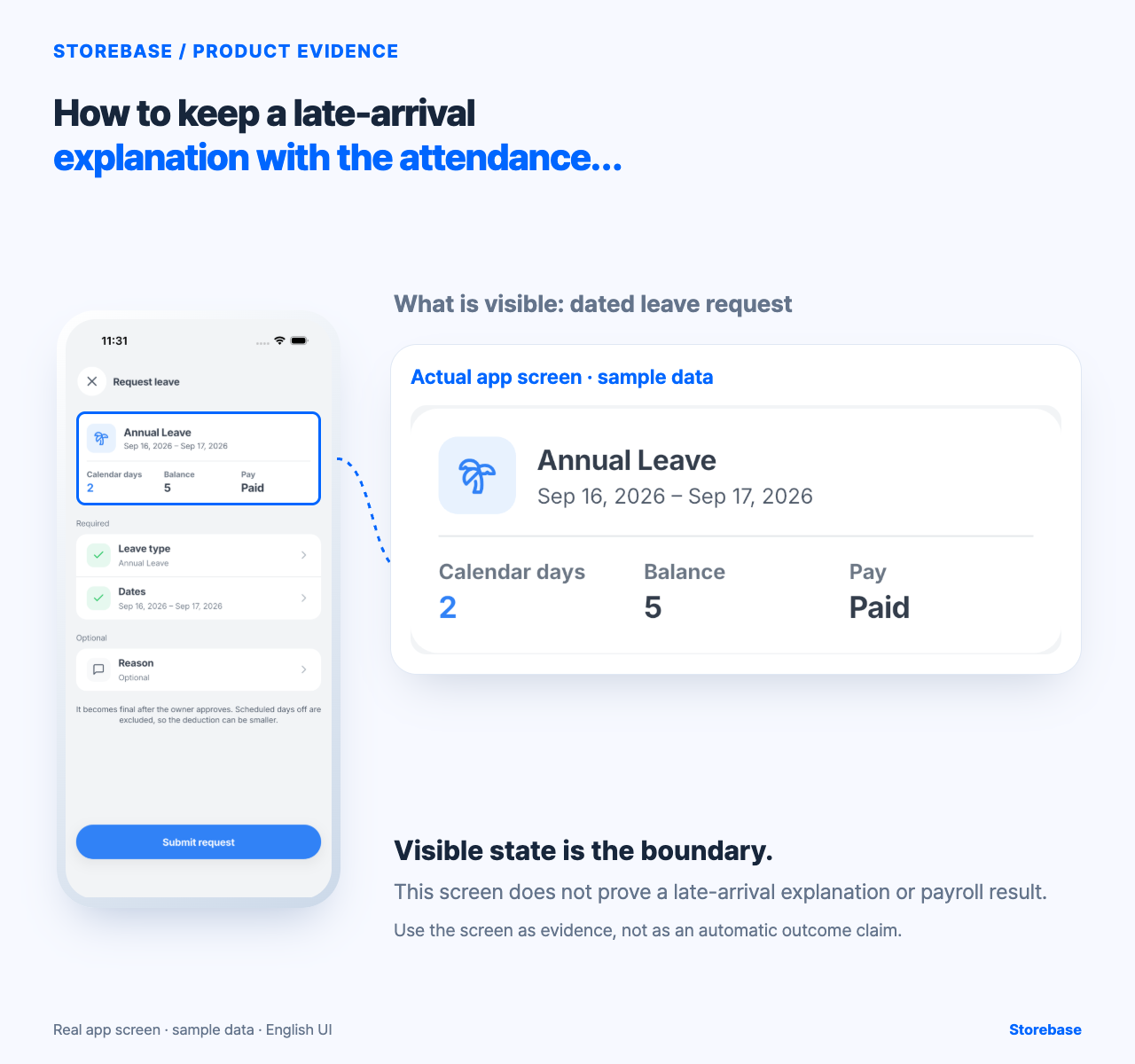
The captured Request leave screen shows a dated request for Annual Leave, the dates Sep 16–17, a balance of 5, Paid status, an optional Reason row and a Submit request button. The Leave approvals screen shows a pending request with dates, days, a status and Approve/Reject actions. These screens make a reason and an owner’s decision visible for a leave request.
That is useful for a planned absence, but it is not the same as attaching an explanation to an existing late-arrival event. Use these leave screens only for a planned absence and its human review. For a late event, keep the original timestamp and the explanation in the attendance record or controlled log that your policy names. Do not assume the optional leave reason is attached to a clock-in, and do not treat either screen as approval of paid time or a payroll correction.
A short exception log
| Field | What to write |
|---|---|
| Event | Date, store, shift and employee |
| Recorded fact | Scheduled start and recorded time |
| Explanation | The person’s words, with any supporting note |
| Decision | Correct, excuse, reschedule or no action |
| Owner | Who reviews and by when |
| Payroll note | What still needs separate confirmation |
Keep the employee’s explanation factual and access-controlled. Do not turn a late note into a public accusation, and do not let a manager rewrite the original timestamp without a correction trail.
Check before payday
Choose one recent exception and follow it from the attendance event to the explanation and decision. Ask a second manager to find it using only the date, store and shift. If they must search a private chat or ask the original manager to remember the context, the handoff is not complete.
Then check what will actually reach payroll. A recorded explanation may support a human decision; it does not itself approve paid time, change a schedule or calculate wages. Until the product can demonstrate the attendance link and saved behaviour, keep that final check with the responsible manager or payroll adviser.
A small, dated exception record gives the owner a place to look while the shift is still recent. It also leaves room for a fair explanation without changing the fact that was recorded.
Use three clocks so a late explanation does not become a late decision
Keep three timestamps: when the attendance event occurred, when the explanation was received and when an authorized person classified it. They answer different questions. The recorded arrival anchors the fact; the received time shows whether context was supplied while it could still be checked; the decision time reveals whether the store allowed an ordinary exception to sit until payroll. Editing one timestamp to make the story cleaner destroys that distinction.
Set a response window in the store's policy that fits the work and local obligations. During that window, the manager gathers any schedule change, transport notice or other permitted supporting material and chooses the next status. If the evidence is incomplete, the case remains pending with a named follow-up time. A pending case should not silently become unexcused merely because payroll approached, and a friendly explanation should not silently rewrite the recorded event. Any effect on wages, discipline or leave follows its own authorized policy and professional review.
Storebase's captured leave-request and approval screens demonstrate dated planned absence, an optional reason and human approval actions. They do not demonstrate a saved link between a late clock-in and its explanation. Until that connection is observed, keep the response clock and attendance reference in a controlled operating log, and do not represent the adjacent leave flow as proof of attendance correction.
Test the policy for consistent judgment, not identical punishment
At the end of a review cycle, remove names from a small set of recent cases and ask another authorized manager to classify them using the written policy and available evidence. The managers do not need to choose identical consequences; circumstances and local rules may differ. They should agree on which facts are established, which evidence is missing, who has authority and what must happen next. A disagreement at that level exposes a weak operating rule before it becomes a personal dispute.
For each divergence, improve one thing only: the event reference, the evidence requirement, the decision boundary or the escalation path. Then reclassify the same cases without changing their original facts. The regression gate is that an older case remains findable under its original decision, while the revised policy governs new decisions from its effective point rather than rewriting history. Record exceptions to the new rule explicitly so a manager cannot create a private standard through chat.
The owner should see policy conflicts, unresolved payroll impact and repeated failures to decide within the response window—not every explanation. When routine cases are attached to their events and settled by the responsible manager, the owner can review whether the system is fair and timely without becoming the inbox for each late arrival.
Related resources
Explore Storebase team-management features
Employee clock-in rules: separate the timestamp from the decision