
STOREBASE INSIGHTS · Team management
How to review attendance problems before payday
Make attendance review a short daily or weekly check. Open the store’s Shift Management Problems tab, choose Today, Week or Month, and investigate exceptions while the shift is still recent. Do not wait until payroll to reconstruct what happened.

On this page
The timing is the problem
A fingerprint or clock-in system can record an event and still leave the owner with a late question. If the first review happens on payday, the manager has to remember which shift was open, who was expected and whether a message explained the absence. The record exists, but its useful moment has passed.
The practical lesson is plain: The fingerprint scanner does record. But the owner learns the employee never showed for open — on payday. The problem is never what you know; it is when you know it.
That changes the task. You are not trying to judge a worker from one number. You are moving the first look earlier, while the people who worked that shift can still explain it.
A small review routine
- Choose a cadence. For a small team, check after the opening shift or at the end of the day. For a larger schedule, check at least once during the week. The exact cadence is an operating choice, not a measured Storebase result.
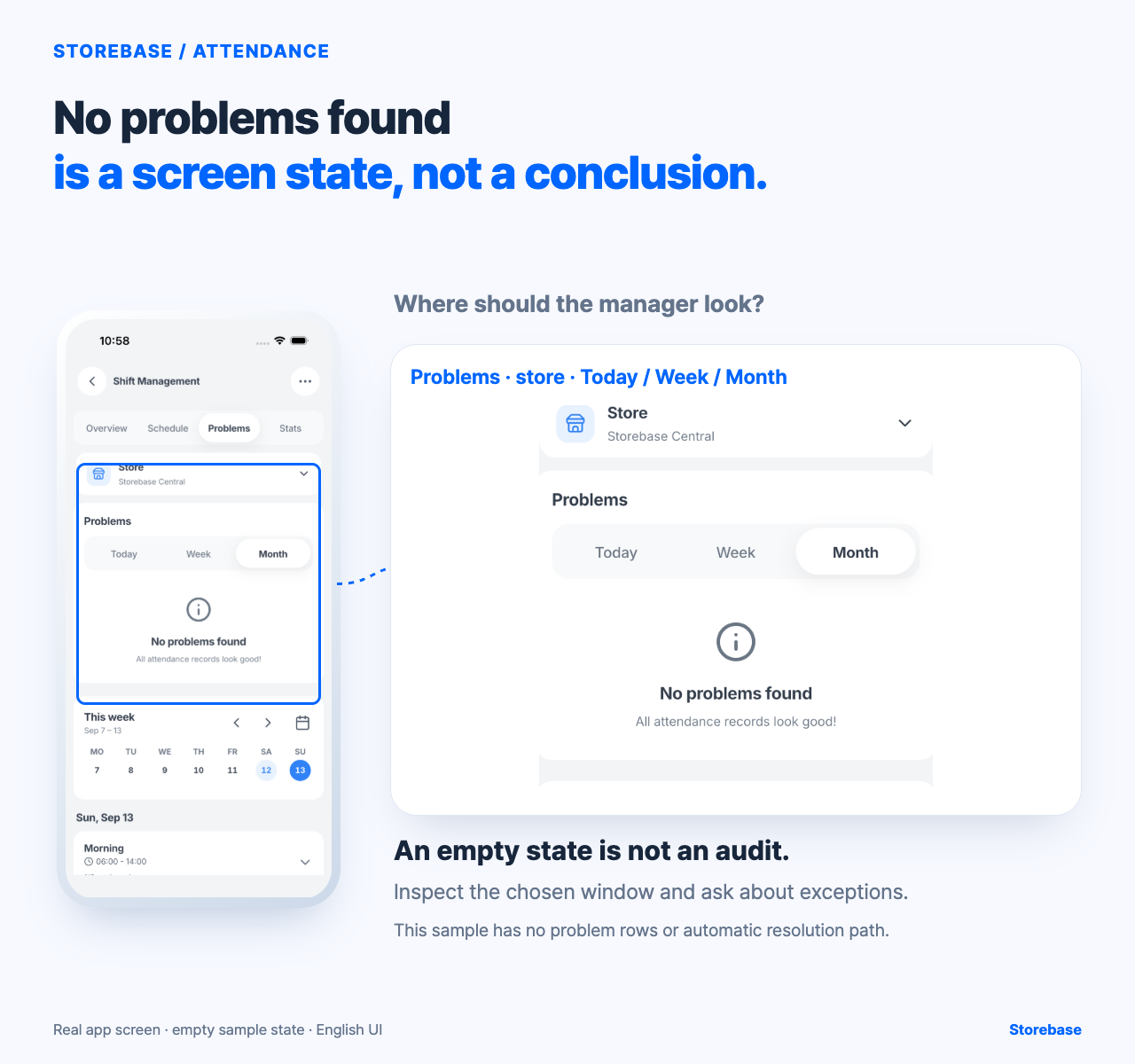
- Open the right view. In Shift Management, open Problems and choose the store. The captured screen offers Today, Week and Month ranges. Start with Today when you need a fresh answer; widen to Week or Month only when looking for a pattern.
- Separate an exception from a conclusion. A missing check-in is a prompt to investigate, not proof of misconduct. Ask what happened, record the explanation through your normal process, and apply the same policy to comparable cases.
- Close the loop. Note whether the attendance record needs correction, whether a schedule needs attention, and who owns the next action. Payroll calculation and discipline remain separate decisions.
What the screen can and cannot show
The current screenshot shows Shift Management with the Problems tab selected, the Storebase Central store selected, and Month active. It displays “No problems found” and “All attendance records look good,” with the week’s dates and a morning shift visible below. This is useful evidence for the review location and time filter. It is not evidence that a populated problem queue, automatic classification or a particular no-show exists.
Use the Problems view as the manager’s place to inspect a selected time window for late arrivals, early leaves or no-shows. The captured view confirms the store and time-range context, but it is empty, so do not promise populated rows, automatic classification or a particular resolution path until those behaviours have been checked in your workspace.
The owner’s checklist
| Check | What you decide |
|---|---|
| Expected shift | Was someone scheduled to open? |
| Recorded event | Is there a clock-in, missed check-in or other exception? |
| Explanation | Does the person have a reason that should be recorded? |
| Next action | Correction, conversation, schedule change or no action? |
| Payroll impact | What should be calculated after the record is confirmed? |
This keeps the record and the judgement on separate lines. It also prevents a manager from turning a missing event into a final accusation.
Check the result
Pick one review window and write down the date, store and number of items you saw. Re-open the same window after the responsible person has completed the next action. If the display changes unexpectedly, or if the screen cannot explain how an item was created or resolved, stop and verify the workflow with the team. Do not claim that an empty state proves every attendance record is correct.
A few minutes of timely review can change the owner’s work from payday archaeology to a small, current decision. When nothing needs attention, the owner can leave the store alone. When something does, the record points to the next person and the next question before the whole month has passed.
Give every exception an age and a closing condition
Review frequency alone does not prevent late surprises. An item can be seen on Monday and still reach payroll unresolved because nobody recorded when it was noticed, what evidence was missing, or what would count as finished. Treat the exception as a case with a short life cycle: occurrence time, discovery time, response due, decision, correction if any, and final verification. The gap between occurrence and discovery reveals whether the team is learning soon enough; the gap between discovery and closure reveals whether ownership is working.
For each open item, preserve the scheduled shift and original clock event, then add the explanation source, current owner, next action, due time, and closure evidence. “Spoke to the employee” is an activity, not closure. Closure means the schedule and event have been reconciled, any approved correction has its reason, and the downstream payroll input has been checked without erasing the source. If facts remain disputed, keep the case open and record the precise question rather than selecting the most convenient version.
Run this for two consecutive review periods in one store. At the end of each period, separate cases that were discovered late from cases that were discovered promptly but stalled. A rising backlog of old items means the issue is no longer the review cadence; it is missing authority, evidence, or follow-through. That distinction tells the owner whether to change the review window, give a manager a clearer decision boundary, or repair the way explanations and corrections are attached.
Escalate by risk and authority, not by notification volume
Decide in advance which cases a manager may finish and which ones require the owner. A documented device outage, an approved swap already visible in the schedule, or a missing punch confirmed by both the shift record and the people involved may fit an ordinary correction route. Repeated unexplained absences, conflicting evidence, a change that reaches a locked payroll period, or a decision outside the manager’s authority should move upward with the source record attached. The exact boundary depends on the store’s policy and applicable employment rules.
The Storebase evidence available for this article confirms a Problems review location, store selection, and time-range controls in an empty sample state. It does not establish how populated cases are created, aged, assigned, saved, or cleared. Verify those behaviours in the actual workspace before relying on the screen as the case ledger. Until then, keep the operating record outside the claim: the team still has to investigate the event, apply policy, authorize a correction, decide any payroll or disciplinary consequence, and confirm the final record.
The regression gate is simple. Pick a closed item after payroll preparation and ask a manager who did not handle it to reconstruct the scheduled shift, original event, explanation, decision, and final status. Pass only if that person can do so without private messages or the owner’s memory. If a quiet list results from cases being ignored or cleared without trace, the process has become less visible, not more reliable.
Related resources
Explore Storebase team-management features
How to keep a late-arrival explanation with the attendance event