
STOREBASE INSIGHTS · Sales and finance
How to record a staff meal stipend without a chat trail
Write the staff-meal policy first, then record each meal or stipend as a named, dated journal entry with a balanced debit and credit. The record shows what was entered; it does not prove theft or replace the policy.

On this page
A free meal still needs a record
A staff meal is easy to treat as too small to log. One person eats during a shift, another takes a discount on a day off, and a third remembers a different limit. When the only rule is in a group chat, the owner cannot tell whether the difference is an approved benefit, a missed entry or a real variance.
The owner’s situation is specific: operators describe a fixed meal stipend, ringing it up as an employee meal and charging any excess at the employee discount. The underlying lesson is: A named record keeps an agreed staff benefit visible even when the owner is not on the floor. For this article, keep the safe part: a clear record supports a fair review. Do not turn an entry into proof that a person stole anything.
Decide the policy before the entry
- Define the benefit. Is it one meal, a fixed amount, one item, or a percentage discount? Does it apply only on working days? Who is eligible?
- Choose the account treatment. Your bookkeeper or accountant should decide whether the entry is staff meals, a benefit, a discount, or another local category. Storebase does not decide your tax treatment.
- Give the entry an owner and date. The person who receives or records the meal should be identifiable, and the date should match the event.
- Separate excess from the included amount. If your policy lets an employee spend above the stipend, record the additional amount under the policy you approved.
What the current screen supports
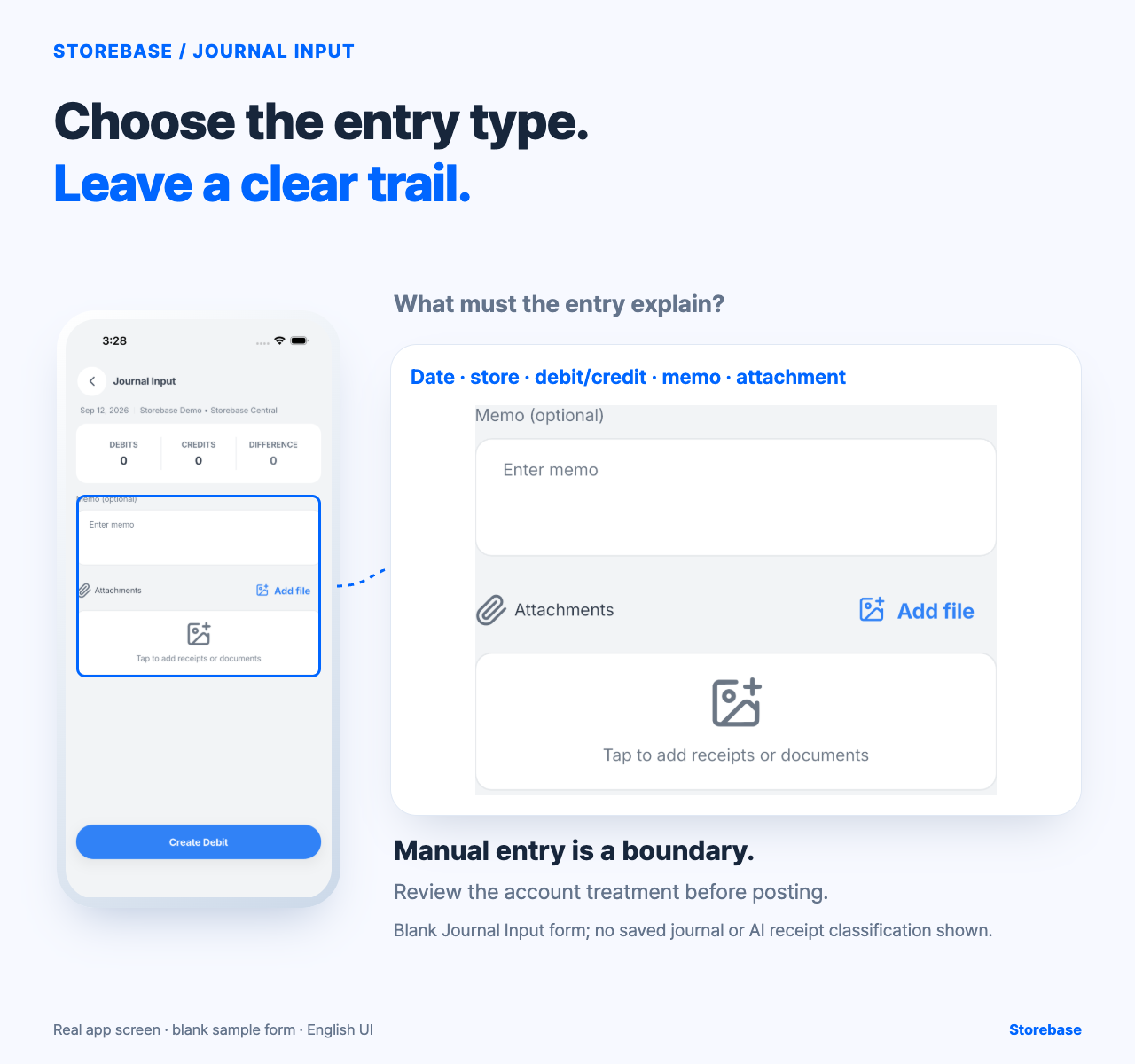
The captured Journal Input screen is deliberately plain. It shows the selected date and store, totals for Debits, Credits and Difference, an optional memo, an attachment area and a Create Debit button. A manager can use that form to prepare a manual journal entry and check that the difference is zero before creating the debit. A memo such as “staff meal — Sep 12 — shift meal policy” gives a later reviewer a starting point.
That is the bounded product action. The Journal Input form supports manual double-entry preparation and a balance check. It does not, on this screen, show receipt upload, AI account classification or account suggestions, so do not present it as knowing who consumed a meal, identifying theft or posting a compliant payroll benefit.
Use one small control table
| Field | Example decision |
|---|---|
| Policy | One meal during a scheduled shift |
| Included amount | Fixed limit approved by the owner |
| Entry memo | Date, store, employee reference and reason |
| Journal check | Debit and credit difference is zero |
| Supporting evidence | Receipt or approved record when required |
| Review | Bookkeeper checks the account and period |
Use examples only as a format. Do not copy a dollar amount or category into a real payroll or tax return without local advice.
What remains human
A journal input does not create the meal policy, determine eligibility, decide whether an excess was intentional, or investigate a suspected loss. The owner or manager still approves the policy. The person responsible for the shift supplies the factual record. A qualified bookkeeper checks the category, tax treatment and period. If the record conflicts with the stock count or till, investigate the mismatch without accusing a worker from the journal alone.
The result to check is modest but useful: after saving a controlled test entry, reopen the journal or ledger and confirm date, store, memo, debit, credit and balance. Compare one week of recorded meals with the approved policy. If an entry cannot be traced or the difference is not zero, stop and resolve the record before using it for payroll, tax or performance action.
A visible staff-meal record turns “I think that was allowed” into a question with a place to look. That can reduce repeated explanations and leave the owner free to handle exceptions. It is a record, not surveillance; evidence, not a verdict.
Keep entitlement, consumption, charge, and accounting treatment separate
A meal policy creates an entitlement under stated conditions; it does not prove a meal was taken. A consumption record says what left the kitchen or shelf; it does not decide whether the item was included, discounted, owed by the worker, or absorbed by the business. A charge or settlement records who paid any amount due. The journal treatment then translates the supported event into the books under the business's approved accounting policy. Keep these four facts distinct and link them with a common reference rather than asking one memo to stand in for all of them.
This distinction makes exceptions easier to diagnose. An eligible meal with no consumption entry is a missing operational record. A recorded item above the allowance may require a separate charge, an approved exception, or correction of the quantity. A balanced journal with no underlying event is still unsupported. None of those states alone proves misconduct. Name the person responsible for resolving the missing layer, preserve the original source, and let the qualified reviewer decide the financial and tax treatment.
Test a reversal as carefully as the original meal entry
Use a controlled example in which a meal is recorded against the wrong date, store, employee reference, or policy period. Do not overwrite the first explanation. Preserve the erroneous record, state why it is being corrected, identify the person authorizing the change, prepare the reversing or corrective entry required by the accounting process, and verify the final view against the operational source. Then ask a reviewer who was not present to explain both the original event and the correction. If that person sees only a clean final balance, the handoff has lost the reason.
The inspected Storebase Journal Input form displays date, store, debit and credit totals, difference, memo, attachments, and a control to create a debit. This supports preparing a manual balanced entry. It does not demonstrate that meal eligibility, kitchen stock movement, employee payment, payroll, or a reversal is automatically connected. Nor does the screen establish that an entry was saved or posted correctly. Use the visible fields to carry a reference and evidence, then verify the resulting ledger through the responsible process. The owner benefits when ordinary entries and corrections remain explainable without a chat search, while disputed eligibility or accounting classification follows the appropriate expert route.