
STOREBASE INSIGHTS · Inventory management
How do you buy from a stock snapshot when movements are still in flight?
Put a timestamp and store scope on the stock snapshot, then reconcile receipts, transfers, sales and adjustments that happened after it before deciding what to buy. A logistics screen may organize the work; it does not make stale data live or prove every channel is synchronized.
On this page
Treat the timestamp as part of the number
A stock snapshot without a time is not a decision basis. Before buying, write the store scope, item unit, snapshot time and person who prepared it. Then list movements that may still be in flight: a delivery not yet counted, a transfer between stores, a sale batch waiting to post, a return or a damage adjustment. “On hand” and “available to buy against” are not the same until those movements are reconciled.
Do not ask a later spreadsheet to repair an earlier snapshot silently. Keep the original snapshot and add a reconciliation note showing what changed after the cutoff. If the movement cannot be confirmed, label the value “not verified” and hold the purchase decision or escalate it.
Use a before-buy bridge
| Question | Minimum record | Action |
|---|---|---|
| When? | snapshot date, time and timezone | reject an unbounded number |
| Where? | store, warehouse or channel scope | prevent cross-store mixing |
| What changed? | receipt, sale, transfer, return or adjustment | reconcile the delta |
| Who checked? | preparer, reviewer and next check | assign the decision |
A live-looking total can still be late. A supplier delivery may be on the dock, a transfer may be recorded at one store but not the other, or a marketplace sale may sit outside the store record. The answer is not to invent a universal “live” label; it is to state what the snapshot includes and what remains open.
Use Storebase logistics with the intended store selected
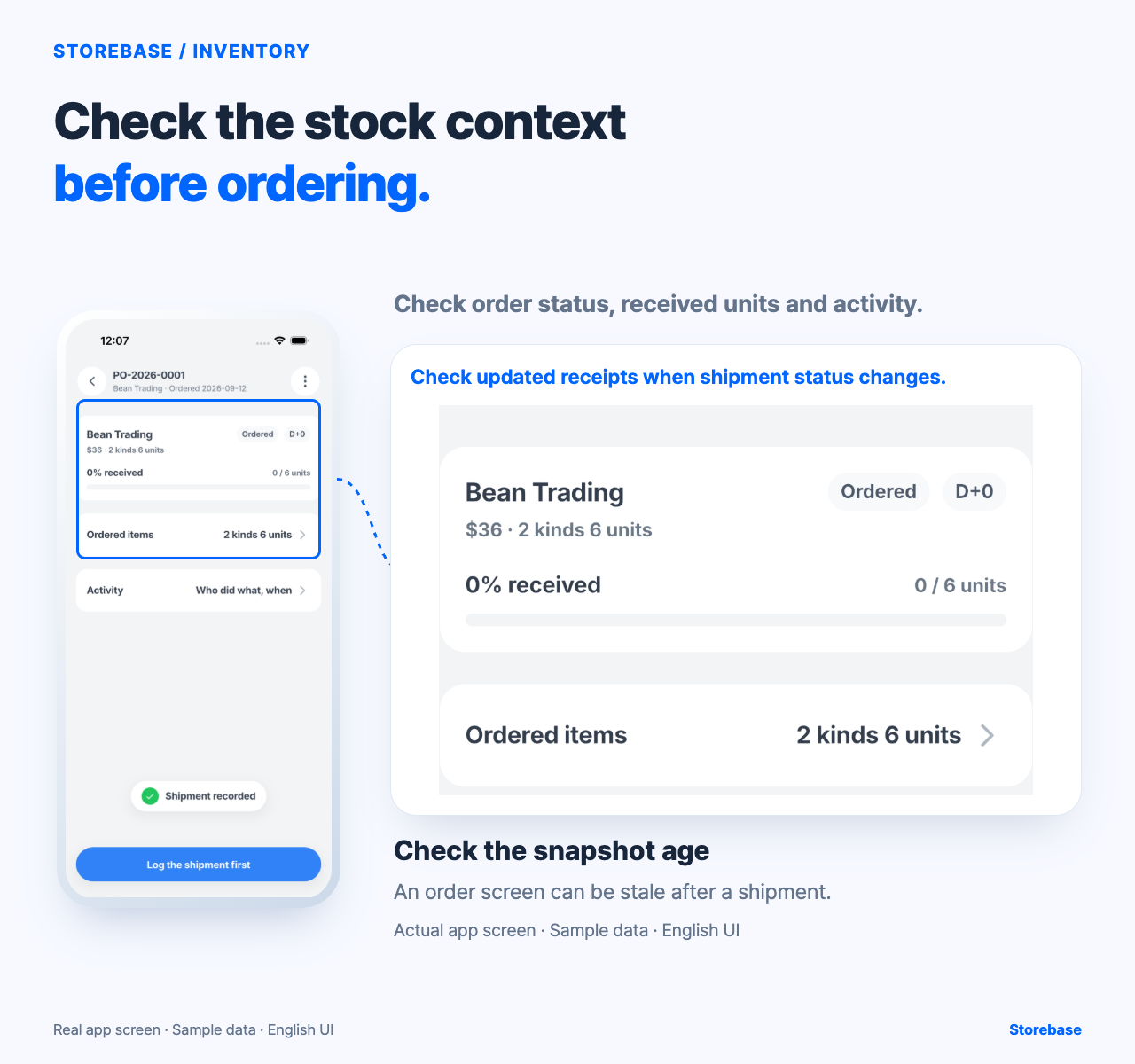
Open Storebase logistics with the intended company and store selected. Check the order status, received units and activity against dated movement records before deciding what to buy. Do not assume an integration imports every channel or that a screen is current just because it is populated.
Storebase can organize a scoped logistics check around the selected store and order. The preparer still fixes the cutoff, the team reconciles open receipts, transfers and sales, and the manager decides whether the data is usable. An order screen does not make a stale snapshot live or prove that the latest movement is included.
Use a handoff. The person preparing the snapshot fixes the cutoff and scope. Receiving records deliveries, store staff record transfers and sales, and a manager reconciles open movements before approving a purchase. The owner handles a material uncertainty or a decision outside policy. This is narrower than a reorder-point article: the question is whether the data is current enough to use, not how to calculate a minimum.
Snapshot-before-buy checklist
- Record store scope, item unit, cutoff time, timezone and preparer.
- List every open receipt, transfer, sale batch, return and adjustment.
- Reconcile each movement to the snapshot or label it “not verified.”
- Compare available stock with the quantity shown in the snapshot.
- Record reviewer, decision, unresolved amount and next check date.
- After buying, compare the decision with the final receipt and movement trail.
If the snapshot has no time or scope, stop at review needed. Do not treat a report captured after the cutoff as evidence of what was known before buying. A populated screen still needs a dated movement check; do not assume channel synchronization, delivery success or saved data from appearance alone.
Start with one store and one open delivery. Mark the snapshot cutoff on the order review, reconcile the delivery when it is counted, and preserve the difference if the timing cannot be established. The conditional benefit is fewer decisions made from silently stale numbers and a clearer question for the manager. It is not a promise that every screen is live, every channel agrees or every purchase will be correct.
A small pilot
For a first pilot, mark the cutoff beside the order review and ask the receiver to note every movement that crossed it. Compare the pre-buy view with the post-count view without overwriting either one. The gap between them is evidence about process timing; it is not evidence that one person made an error or that a new “live” label should be invented.
Set a freshness budget for the purchasing decision
Not every item becomes unsafe to buy from at the same speed. Define a store-owned freshness budget from the decision horizon, the item's movement rate, supplier lead time, open-channel latency, and the cost of being wrong. A slow, stable item may tolerate an older confirmed snapshot; a fast seller with an unreceived shipment or delayed sales feed may require a new count or a held order. The budget is not a universal number and it is not proof that a snapshot is accurate. It is the point at which the buyer must refresh evidence or escalate rather than quietly accepting age.
Record the snapshot age and the newest confirmed movement beside the buy decision. Also state which movement sources were checked and which remained unavailable. This distinguishes a known quiet period from an unknown gap. If the information exceeds the chosen budget, the buyer needs an explicit exception owner and reason. The aim is not to make every purchase wait for perfect information. It is to make the risk visible to the person authorized to carry it, instead of letting a populated report decide by appearance.
Reconstruct the counterfactual after receipt
When the goods arrive and the delayed movements have settled, preserve both the pre-buy view and the reconciled view. Ask what quantity the same policy would have selected with the later evidence, then identify which late fact changed the answer: receiving, transfer completion, sales posting, return, damage, or unit correction. Do not score the buyer only on whether demand happened to consume the order. A lucky outcome can hide a poor evidence gate, while a reasonable decision can still face unexpected demand.
Use the finding to adjust the freshness budget, the required source check, or the escalation condition for the next order. Storebase logistics can organize an order, shipment, and receiving context for the selected store, but the available evidence does not establish synchronization with every commerce channel or guarantee that each visible status is current and persisted. A regression pass therefore compares dated source movements with the product view again; it does not replace them. This closes the learning loop without making the owner manually merge every purchase, because only cases that exceed the agreed information risk need owner attention.
Related resources
Explore Storebase inventory features and their scope
How can a purchase order stay connected to what each store receives?