
STOREBASE INSIGHTS · Inventory management
How can a team split a stock count without counting the same shelf twice?
Split the count by an explicit shelf, SKU or location ownership, then review overlaps and omissions before saving. Parallel phones can make the work faster, but a person still confirms the boundary, resolves duplicate counts and approves the result.

On this page
Define the boundary before counting
A team count goes wrong when “the back shelf” means one thing to one person and another thing to someone else. Before anyone starts, write the store, count session, cutoff time, unit and exact ownership boundary: for example, aisle 1–3 for one person, aisle 4–6 for another, or a named SKU list for each phone. Mark shared displays, returns and stock waiting for transfer instead of giving them to two people by assumption.
The boundary is part of the count. If a person finds a product outside the assigned range, they should flag it for the owner rather than silently counting it again. A note such as “aisle 3 end-cap included” prevents a later merge from becoming a debate about what each number means.
Merge only after checking overlap
| Check | What to record | Why it matters |
|---|---|---|
| Scope | store, session, cutoff and assigned range | makes ownership testable |
| Count | item, unit, quantity and counter | separates values with the same SKU |
| Exception | duplicate, omitted or moved item | keeps a conflict visible |
| Review | reviewer, decision and next check | stops an unexamined total going live |
A product counted twice is not solved by choosing the larger number. Compare the entries, inspect the boundary and decide which physical location owns the unit. A missing SKU is not automatically zero; check whether it was outside the assignment, reserved, damaged or still in receiving. Leave unknown facts as “not verified.”
Review the combined count in Storebase
Open the stock-count review and compare the counted quantity with the existing quantity before submitting. Use your own assignment map to resolve overlaps; a total alone does not tell you whether two people counted the same shelf. Review the visible differences and leave an unknown location open for the manager.
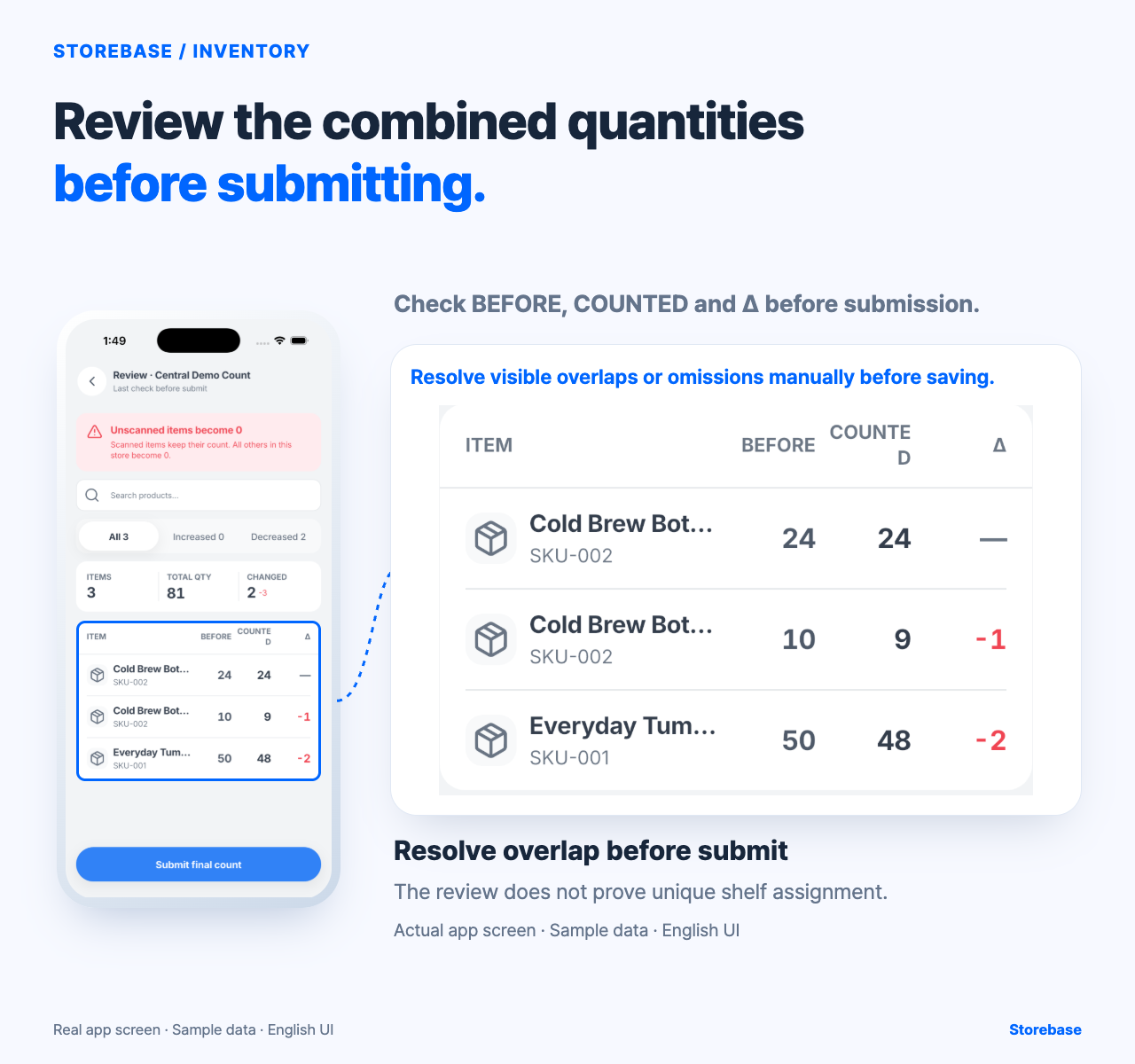
Storebase can give a team a shared review point for counts entered on several phones. The person in charge still defines the zones, checks the physical shelves and decides whether the count is ready to submit. This screen does not establish that shelves were uniquely assigned or that the final count has been saved.
Use a human handoff. The count lead defines ranges and the cutoff. Each counter records only the assigned range and flags anything crossing it. A manager checks duplicates, omissions, units and unusual differences. The owner handles a policy exception or a material unresolved conflict. Parallel counting does not eliminate review; it changes where the checking happens.
Team-count checklist
- Name the store, session, cutoff and counting unit.
- Map every shelf, SKU or location to one owner; mark shared areas explicitly.
- Record each quantity with counter, time and boundary.
- Flag duplicates, omissions, transfers, returns and damaged stock instead of guessing.
- Reconcile conflicts and confirm the review before saving.
- After the count, compare the saved result with the next observed movement.
This is a team-count handoff, not a reorder recommendation or a receiving-discrepancy conclusion. If the session, range or counter is missing, stop at “review needed.” Ask the manager to confirm ownership and timing rather than guessing from the device or the total.
Start with one small zone. If two counters meet at the same shelf, agree on a visible boundary and record the decision. If a product appears in two locations, record both and decide whether it is one move or two owned quantities. A clean result is useful only when another person can reproduce the scope and understand why a conflict was resolved. The conditional benefit is less manual merging and earlier visibility into exceptions—not proof that stock is accurate without a review.
A small pilot
For a first pilot, choose a zone with a clear end point and ask a second person to audit only the boundary. Compare the two records before any stock update, then write down what the team changed in its assignment map. That small audit tests the handoff itself: whether a new counter can understand the range, the unit and the exception path without asking the owner to rebuild the plan.
Give moving and shared stock a custody state
A coverage map fails if it treats every unit as fixed on a shelf. Before the session, define custody for receiving bays, carts, returns, display samples, damaged goods, packed transfers, and items being carried between zones. Each such pool needs one session owner and one state: included at origin, included at destination, excluded pending verification, or counted in a dedicated mobile zone. The labels are operational choices for that session; they must match the cutoff and should not be inferred from where a box happens to sit when someone scans it.
When custody changes during the count, preserve the transition rather than moving the same quantity silently. Record the time, from-zone, to-zone, responsible person, and whether the unit had already been counted. If the answer is unknown, quarantine that quantity from the proposed total until the lead resolves it. This closes a gap that shelf partitions alone cannot handle. It also prevents two honest counters from producing a duplicate simply because stock crossed their boundary between scans.
Audit the merge with count invariants
Before approval, test several conditions that must remain true regardless of how many phones were used. Every mapped zone has exactly one disposition for the session. Each accepted entry carries the session, location, item, unit, counter, and observation time needed to interpret it. A duplicate conflict is resolved with a reason rather than by deleting the less convenient number. An omitted item becomes zero only under the approved full-count rule and after the relevant safeguard is confirmed. Movements crossing the cutoff are either applied once or held once, never both.
Sample a boundary, a mobile-stock pool, a duplicated item, and an apparent omission. A reviewer who did not design the map should be able to reproduce the chosen total from the accepted entries and exception decisions. The verified Storebase capability supports team counting on phones, merging into a review, warning before missed items become zero in a full count, and reviewing what changed and who counted before save. The inspected screen does not prove unique shelf assignment or that a final stock update persisted. Keep the custody map and cutoff reconciliation as human controls around that review. When the merge can be reproduced without asking the owner to remember where stock was, the team owns the count and only unresolved policy exceptions reach the owner.
Related resources
Explore Storebase inventory features and their scope
Why inventory doesn't match: fixing the number is only the start
How should staff record consumption and waste when stock moves?